邮件、订单、单据、收款,
Mia 替你跟到底。Email, orders, documents, payments. Mia follows each one through.
MiaWork 读懂每一封客户来信,查你的价目表、合同和往来,用客户的语言写好回信;订单从工厂、货代到尾款一步步跟着,缺什么才问你。对外的每一封信、每一笔承诺,都等你点头才发。MiaWork reads every customer email, checks your price lists, contracts and past mail, and drafts the reply in the customer's language. It follows each order from factory to forwarder to final payment, and only asks you what it cannot find. Every outgoing email and every commitment waits for your OK.
●已在为真实客户提供服务,可以按你的业务配置和定制。Already working for real customers, and set up to fit how your business runs.
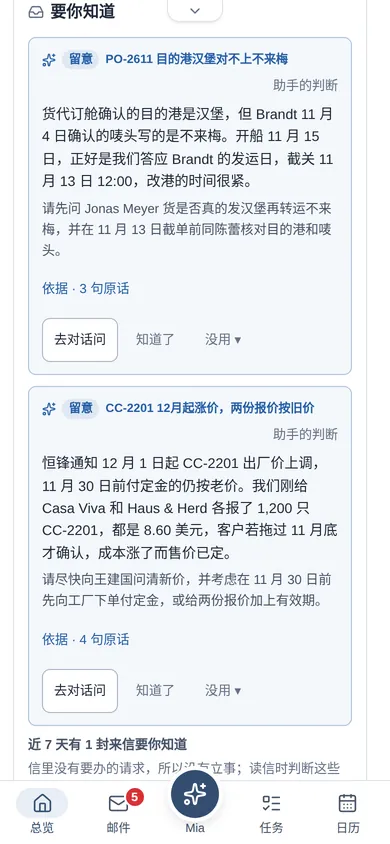
真实运行的系统界面。示例公司:澄川贸易(宁波),6 人,出口不锈钢厨具,客户在德国、西班牙、瑞典、迪拜、加拿大(虚构)。Screens from the running system. Example company: Chengchuan Trading, Ningbo — six people exporting stainless steel kitchenware to Germany, Spain, Sweden, Dubai and Canada (fictional).
邮箱就是工作台Your mailbox is the workbench
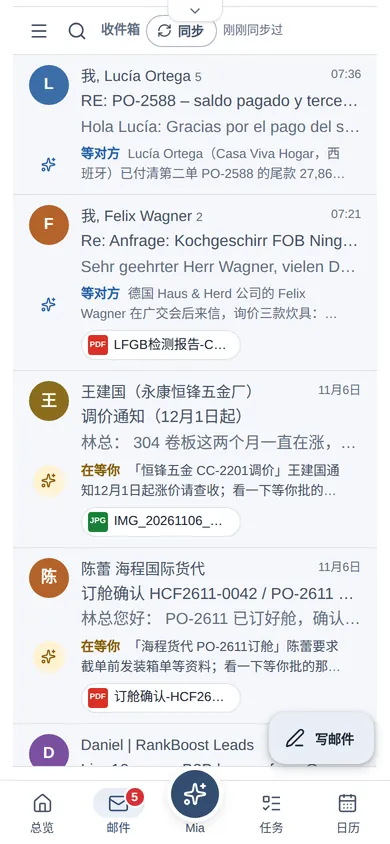
每封来信下面一行写着 Mia 在做什么;写好的回信摆在那串往来最上面。Under every email, one line says what Mia is doing with it; the drafted reply sits at the top of the thread.
缺什么才问你It asks only what's missing
先查价目表、记录和资料;找不到的才问,问题带编号选项,点一下就答。It checks price lists, records and files first; only gaps come to you, as numbered options you tap.
每封对外信你拍板You approve every outgoing email
缺省「实习助理」:草稿它写,发不发你定;金额、承诺和附件在发出前摆在你眼前。By default Mia is an "intern": it drafts, you decide. Amounts, promises and attachments are laid out before anything leaves.
替你留意全局It watches the whole picture
把邮件、订单和日程放在一起看,发现报价还按旧价、单据对不上,带原话提醒你。It looks across mail, orders and your calendar, and flags things like quotes still at the old price, with the quotes to prove it.
七个菜单,一个替你办事的助理Seven menus, one assistant doing the work
下面每一张都是 MiaWork 实际运行时的截图,数据来自虚构的澄川贸易。Every picture below is a screenshot of MiaWork running, with data from the fictional Chengchuan Trading. The app's interface is in Chinese.
一进门就知道今天该拍板什么See what needs you the moment you open it
- 「等你拍板」排好先后:要你批的回信、要你答的问题,最急的那件点开就能处理。"Waiting for you" is in order of urgency: replies to approve and questions to answer, the most urgent one opens straight away.
- 「要你知道」里是 Mia 每天看一遍全局后的判断,标「留意」或「机会」,附依据原话。"For your attention" holds Mia's daily look across everything, marked "attention" or "opportunity", with the quotes behind it.
- 「我的日程」「别忘了」:邮件里约好的见面、你在信里答应过客户的事,到期前提醒你。"My schedule" and "Don't forget": meetings agreed by email and things you promised in your own emails, with reminders before they're due.
邮箱就是工作台The mailbox is the workbench
- 每封来信下一行「Mia 行」:在等你在办,不用办的通知信是灰色;推销信标「不用办 · 非业务」。One "Mia line" under each email: waiting for youworking on it; notices that need nothing are grey, and sales pitches are marked "not business".
- 回信稿在往来最上面:改、预览、核对附件,点「确认发送」才发出。The draft reply sits at the top of the thread: edit, preview, check attachments; it only leaves when you click Confirm send.
- 德语、西语来信点「译文」看中文;稿上「对照译文」把原稿和中文并排,改中文就是让 Mia 改原稿。German or Spanish email? Open the Chinese translation. "Side-by-side" puts the draft and its Chinese next to each other; edit the Chinese and Mia rewrites the original.
- 已读、星标、归档、删除同步回你原来的邮箱;不用换邮箱。Read, star, archive and delete sync back to your existing mailbox. No need to switch email providers.
像跟助理说话一样,查和办Ask and delegate the way you'd talk to an assistant
- 「今天有什么要我处理的?按急的先说。」——按急的排好,每件写着状态和下一步。"What needs me today? Most urgent first." — sorted, each with its state and next step.
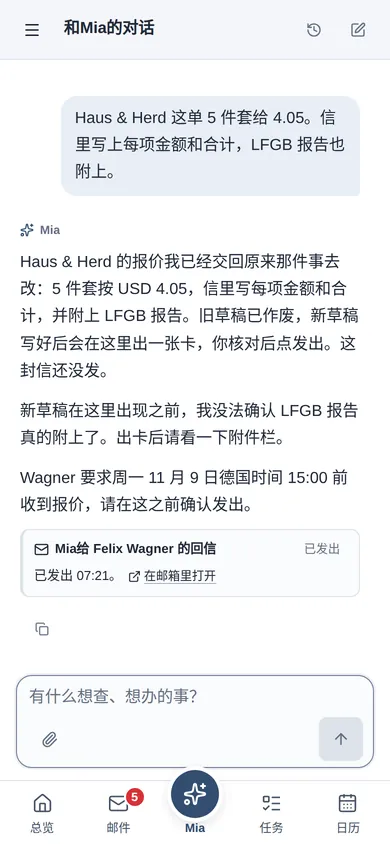
- 「Haus & Herd 这单 5 件套给 4.05」——交回原来那件事重写,新稿就在对话里批。"Give Haus & Herd 4.05 on the 5-piece set" — handed back to that piece of work, and the new draft is approved right in the chat.
- 问资料里的事:「LFGB 报告有效期到什么时候?」扫描件里也找得到,答案下面有依据。Ask about your files: "When does the LFGB report expire?" It finds it even in a scanned PDF, with the source under the answer.
周期的、常驻的事,交给它Hand over the recurring and the ongoing
- 「每周一早上 9 点发我应收账款周报」——查不到、对不上的如实标出,不猜。"Send me receivables every Monday at 9" — anything it can't find or reconcile is marked as a gap, never guessed.
- 「永康恒锋每次报价都核一下」——跟上次出厂价比,算对报价和在手订单的影响。"Check every quote from the factory" — compared with the last price, with the effect on quotes and open orders.
- 「验货前每天问一次王厂长进度」——到点发信,回信要点告诉你。"Ask the factory for progress every day until inspection" — sent on time, with the answer summarised for you.
- 交办卡写明时间、次数和期限,你点「确认并启动任务」才开始;对外的信照样等你批。The task card states time, count and end date; nothing starts until you confirm, and outgoing mail still waits for approval.
邮件里约好的,自动进日程What's agreed by email lands in your calendar
- 一方提出、另一方确认了才记:卡上写着双方原话和提醒时间,不对点「撤销」。Recorded only when one side proposes and the other confirms; the card quotes both sides and the reminder time, with an Undo.
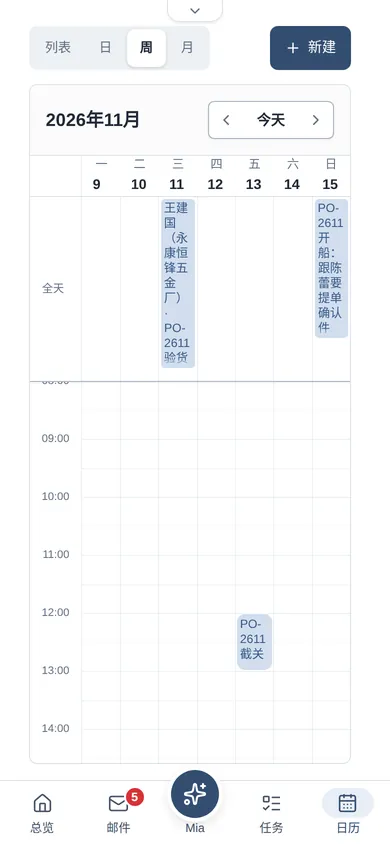
- 「提醒我 13 日中午截关,提前一天」——一句话记下,什么时候提醒你说了算。"Remind me of the cut-off on the 13th at noon, a day ahead" — one sentence, reminded when you say.
- 日程只有你看得到,需要时共享给合伙人。Your schedule is yours alone; share an entry with your partner when needed.
价目表、订单、名片,一导就用Price lists, orders, business cards — imported and in use
- Excel、CSV 导成记录:Mia 看懂每一列出导入卡,你选好使用范围——仅内部,还是本企业对外通用——才导入。Excel and CSV become records: Mia reads each column into an import card, and you choose the scope — internal only, or usable with customers — before anything is written.
- 每条记录写明出处;改动成为新的一版,引文由系统逐字核过,旧值留在修改记录里。Every record shows where it came from; a change becomes a new version, the quote is checked word for word, and the old value stays in the history.
- 产品目录、检测报告、合同存进资料,扫描件也能按页查到。Catalogues, test reports and contracts go into your files; even scanned pages are searchable.
放手多少,你说了算You decide how much to hand over
- 授权档位:旁观、实习助理、智能助理。升一档要你亲手确认、选有效期,到期自动回到实习助理。Authority levels: observer, intern, smart assistant. Moving up needs your own confirmation and an end date; it falls back to intern when it expires.
- 逐项授权:主动准备回信、发邮件、发通知……每项单独设,发信还有自信度门槛。Per-action permissions — preparing replies, sending email, notifications — each set separately, with a confidence threshold for sending.
- 五份基本做法;你纠正一句,它学进做法,「学习记录」写明改了哪句,可以撤掉。Five core practices. Correct it once and it learns; the learning log shows which sentence changed, and you can undo it.
从询价到尾款,Mia 做事,你拍板From inquiry to final payment: Mia does the work, you make the calls
外贸订单要走几个星期,经过客户、工厂、货代和银行。下面是澄川贸易这几天的真实操作记录:一位新客户的德语询价,和一张正在生产的德国订单。An export order runs for weeks and passes through customer, factory, forwarder and bank. Here is a few days at Chengchuan Trading, as it ran in the system: a German inquiry from a new customer, and a German order in production.
-
① 询价进来① The inquiry arrives
德语询价,截止是周一德国 15:00A German inquiry, due Monday 15:00 German time
Mia 做的MIA读懂来信,算出截止是北京时间 22:00;查价目表,4 项要的信息找到 3 项,只问你付款条件,给了现成的选项。Reads the email and works out the deadline is 22:00 in Ningbo; finds 3 of the 4 facts in the price list and asks you only for payment terms, with ready options.你定的YOU「按价目表原价报,30% 定金,70% 见提单副本。」"List prices; 30% deposit, 70% against the B/L copy." -
② 在对话里改价② Change the price in the chat
「这单 5 件套给 4.05,附上 LFGB 报告」"Give them 4.05 on the 5-piece set, attach the LFGB report"
Mia 做的MIA把话交回这件事,旧稿作废;按 4.05 重算,合计 US$28,320.00(原价是 US$28,560.00),新稿在对话里出卡。「发送前请留意」写明低于目录价、钱款承诺和要附的报告。Hands your words back to the work and withdraws the old draft; recalculated at 4.05 the total is US$28,320.00 (US$28,560.00 at list price), and the new draft appears as a card in the chat. "Before you send" lists the below-list price, the money commitment and the report to attach.你定的YOU在附件页勾上报告(内部合同标着「不能给这位收件人」),确认发送。Tick the report on the attachments tab (the internal contract is marked as not for this recipient) and confirm. -
③ 发出,接着等回音③ Sent, and followed
回信接在原信下面,带着检测报告The reply threads under the original, report attached
Mia 做的MIA用德语写明每项单价、金额、交期和付款条件;发出后记成「等对方回复」,到期没回会接着跟。Writes unit prices, amounts, lead times and terms in German; once sent, it's tracked as "waiting for reply" and followed up if nothing comes back.你定的YOU只点了一次「确认发送」。One click on Confirm send. -
④ 生产中,每天问一次④ In production, checked daily
PO-2611 在永康生产,验货前每天问进度PO-2611 in production; progress checked daily until inspection
Mia 做的MIA把你一句话写成交办卡:每天上午 10 点发信问王厂长,到 11 月 10 日为止,回信要点告诉你。Turns one sentence into a task card: email the factory every day at 10:00 until 10 November, and summarise each answer for you.你定的YOU点「确认并启动任务」。Confirm and start. -
⑤ 回客户之前,先核对⑤ Checked before it goes to the customer
Brandt 问验货和提单,回信对过合同Brandt asks about inspection and B/L; the reply is checked against the contract
Mia 做的MIA用德语答验货日期、照片和提单副本时间;「发送前请留意」提醒:合同要求随货发 LFGB 报告,这封信还没提。Answers in German with the inspection date, photos and B/L timing. "Before you send" notes that the contract requires the LFGB report, which this email doesn't mention yet.你定的YOU补一句或直接发。Add a line, or send as is. -
⑥ 验货、截关、开船⑥ Inspection, cut-off, sailing
邮件里定下的日子,都在日历上Dates fixed by email are in your calendar
Mia 做的MIA工厂说 11 日可以验货、你回了「11 日上午,周毅过去」——自动记进日程,前一晚提醒;你一句话记下的截关、开船和迪拜客户的视频会也在上面。The factory said the 11th, you replied "the morning of the 11th" — recorded automatically, with a reminder the evening before; the cut-off, sailing and Dubai video call you mentioned in one sentence are there too.你定的YOU要不要共享给合伙人。Whether to share with your partner. -
⑦ 尾款到账⑦ The balance arrives
银行通知一到,对上订单,差额说清楚The bank notice is matched to the order, and the difference explained
Mia 做的MIA另一张订单 PO-2588:Casa Viva 的尾款发票 US$27,860.00,到账 US$27,814.00,差的 US$46.00 是中转行扣费;准备一张更新卡,引文逐字核过。On another order, PO-2588, Casa Viva's balance invoice was US$27,860.00 and US$27,814.00 arrived; the US$46.00 difference is the intermediary bank fee. It prepares an update card, with the quotes checked word for word.你定的YOU点「记为记录」;订单记录成为新的一版,旧值留着。Click "record it"; the order record becomes a new version and the old values stay. -
⑧ 替你看一眼全局⑧ A look across everything
工厂 12 月涨价,两份新报价还按旧价The factory raises prices in December; two new quotes use the old price
Mia 做的MIA把王厂长的调价通知(CC-2201 ¥52.00 → ¥53.56)和刚报给两位客户的 8.60 美元放在一起看,提醒你 11 月 30 日前下单付定金,或给报价加上有效期;每条附依据原话。Puts the factory's notice (CC-2201 ¥52.00 → ¥53.56) next to the US$8.60 just quoted to two customers, and suggests ordering with a deposit before 30 November or adding a validity date to the quotes — each point with its quotes.你定的YOU「去对话问」,或「知道了」。"Ask in chat", or "Got it".
每一步都留着依据:哪封邮件、哪份文件、哪一行。问一句「为什么」,它就拿给你看。Every step keeps its evidence: which email, which file, which line. Ask "why" and it shows you.
在工厂、在展会、在路上,事情也误不了At the factory, at a fair, on the road — nothing slips
手机浏览器打开就能用,加到主屏幕后像 App 一样。屏底五个按钮:总览、邮件、Mia、任务、日历。Open it in your phone's browser, or add it to the home screen and use it like an app. Five buttons at the bottom: Overview, Mail, Mia, Tasks, Calendar.
早报和提醒用浏览器通知Morning brief and reminders as notifications
每天定时把待批、到期和要你决定的事汇总推给你;免扰时段不打扰。iPhone 加到主屏幕后就能收通知。At the time you choose, a summary of approvals, deadlines and decisions; quiet hours are respected. On iPhone, add it to the home screen to get notifications.
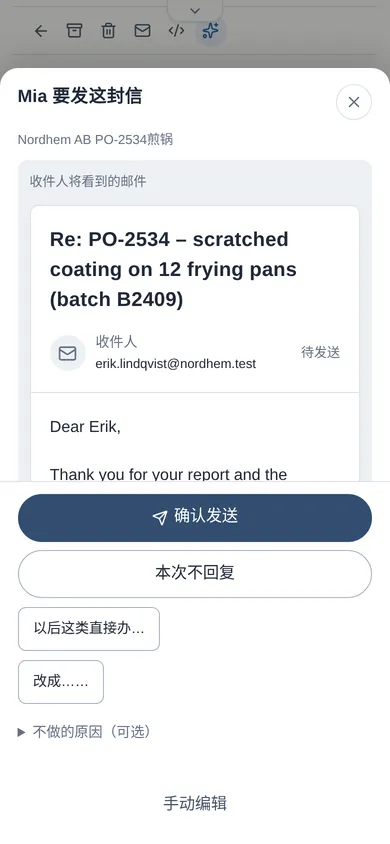
批之前看得到全文See the full email before you approve
批准卡上是收件人看到的整封信、附件和「发送前请留意」;想改就点「改成……」说一句。The sheet shows the whole email as the recipient will see it, attachments and the "before you send" notes; to change it, tap "Change to…" and say how.
也可以接 TelegramTelegram, if you prefer
开通后在 Telegram 里问进展、按编号回答问题;批准、升档要回材料末尾的确认码,一句含糊的「好」发不出去。Once set up, ask about progress and answer questions by number in Telegram; approvals need the confirmation code at the end of the full material, so a vague "OK" can't send anything.
先从谨慎开始,一步步放手Start cautious, then let go step by step
让它多做事,必须你亲手确认,而且有到期日。Giving it more room always takes your own confirmation, and it always has an end date.
旁观Observer
只整理、只准备,对外动作全部暂停。适合刚开始的几天。Organises and prepares; nothing goes out. Good for the first few days.
实习助理Intern 缺省Default
主动查资料、写草稿、准备下一步;每封对外邮件都等你批。Looks things up, drafts and prepares the next step; every outgoing email waits for you.
智能助理Smart assistant
一般邮件自己发(自信度达门槛、每天有上限);有效期 7、30 或 90 天,到期自动回到实习助理。Sends ordinary email itself (above a confidence threshold, with a daily cap); valid for 7, 30 or 90 days, then back to intern.
发出去之前都摆在眼前Everything laid out before sending
「发送前请留意」写明金额、承诺、附件,和信里与合同、记录对不上的地方。"Before you send" lists amounts, promises, attachments, and anything that doesn't match the contract or records.
内部资料不外泄Internal stays internal
每份资料、每批记录都有使用范围;进价、合同缺省仅内部,附件页上直接写明不能给这位收件人。Every file and every batch of records has a scope; costs and contracts are internal by default, and the attachments tab says plainly what this recipient can't receive.
每句话都有出处Everything has a source
回答下面列着依据;记录改动成为新的一版,旧值一直看得到。查不到就说查不到。Answers list their sources; a changed record becomes a new version and the old values stay visible. If it can't find something, it says so.
扩权只能你亲手Only you can grant more
升档、解除暂停要你在页面上亲手确认;对话、来信、粘贴的文字都替你点不了。Moving up a level or lifting a pause needs your own confirmation on the page; nothing in a chat, an email or pasted text can do it for you.
不会重复发,可以一键全停No double sends, one-click stop
说不准发没发出去的信不会自己重发,请你核对;「全部暂停」后,会自己发出去的事都停在待批。If it's unclear whether an email went out, it never resends on its own — you check. "Pause everything" holds anything that would go out by itself.
一家一套,密码不经 AIYour own system; passwords never pass AI
每家企业单独一套系统和数据库;邮箱密码只在设置页填,不经对话;来信和资料里的密码在存档前就抹掉。Each business gets its own system and database; mailbox passwords are entered only in settings, never in chat, and passwords inside emails or files are blanked before storage.
按你的生意来配Set up around your business
MiaWork 已在为真实客户提供服务。每家生意的做法不同:我们按你的方式配置,需要的再定制。MiaWork already works for real customers. Every business runs differently, so we configure it your way and build what's missing.
先聊清楚Talk it through
你怎么接询盘、报价、跟单、收款,哪些事一定要你拍板。How you handle inquiries, quotes, orders and payments, and what must always come to you.
接入和导入Connect and import
接你现在的邮箱;导入价目表、产品目录、检测报告、客户名片和历史邮件。Connect your existing mailbox; bring in price lists, catalogues, test reports, business cards and past email.
写成你的做法Write down your way
报价规则、回信口吻、什么情况先问你,写进 Mia 照着办的做法。Pricing rules, tone of reply, when to ask you first — written into the practices Mia follows.
上线后接着调Keep tuning
你纠正的地方当场学进去;要接新系统、加新功能,按需开发。Corrections take effect on the spot; new connections and features are built as needed.
可以定制的What can be tailored
- 你的规矩:最低价、付款条件、哪些客户要特别对待Your rules: minimum prices, payment terms, customers who need special handling
- 周期报表:应收账款、在途订单、供应商价格Recurring reports: receivables, open orders, supplier prices
- 长期核查:供应商报价、到账、投诉Standing checks: supplier quotes, payments received, complaints
- 开通时预装你的资料、表格和做法Your files, tables and practices preloaded at launch
- 接网店或经审核的外部工具,读写分别授权Your web shop or vetted external tools, with read and write granted separately
- 手机通道、通知语言、免扰时段和营业日Phone channel, notification language, quiet hours and business days
老板们常问的What owners ask us
Mia 会不会背着我发邮件?Will Mia send email behind my back?
缺省不会:每封对外邮件都等你点「确认发送」。你亲手升到智能助理、选好有效期之后,一般邮件它才自己发,而且有自信度门槛和每天的上限;信里有钱款承诺的仍然先问你,到期自动收回。Not by default: every outgoing email waits for you to click Confirm send. Only after you move it up to smart assistant yourself, with an end date, does it send ordinary email on its own — above a confidence threshold and within a daily cap. Emails with money commitments still ask you first.
要换邮箱、装软件吗?Do I need a new mailbox or software?
不用。接你现在的邮箱(Google 邮箱或其他支持 IMAP 的邮箱),浏览器打开就能用。第一次有六步设置,每步都能跳过;点「开始使用」之前它只读、只整理,不对外发任何东西。No. It connects to your current mailbox (Google or any IMAP mailbox) and runs in the browser. First setup is six steps, each skippable; until you click Start it only reads and organises, and sends nothing.
客户写德语、西语怎么办?界面是什么语言?My customers write in German or Spanish. What language is the app?
回信用客户的语言写;外文来信点「译文」看中文,稿子用「对照译文」并排核对。界面目前是中文;通知可以用中文、英文等多种语言。Replies are written in the customer's language; foreign-language emails have a Chinese translation, and drafts can be checked side by side. The interface is in Chinese today; notifications can be in Chinese, English and other languages.
我的进价、合同会不会被写给客户?Could my costs or contracts end up in a customer email?
导入的记录缺省「仅内部使用」,只有你改成「本企业对外通用」的才会用在给客户的信里;内部资料也不会出现在能附给这位客户的文件里。Imported records are internal by default; only those you mark as usable with customers go into customer email. Internal files are never offered as attachments for that customer.
它弄错了怎么办?What if it gets something wrong?
直接告诉它。草稿按你的话重写,旧稿作废;以后都要这样的,它学进做法下次照做,学习记录里能看到、能撤掉。记录不会被覆盖:改正是新的一版。Just tell it. The draft is rewritten from your words and the old one withdrawn; if it should always be that way, it learns it into its practices, which you can review and undo. Records are never overwritten — a correction is a new version.
能连银行、自动收款吗?Does it connect to my bank or take payments?
不连银行,也不付款、不退款。到账靠银行的到账通知邮件或你导入的流水表格:Mia 对上订单、说清差额,你确认了才记账。No bank connection, and it never pays or refunds. Payments are recognised from bank notification emails or statements you import: Mia matches them to orders and explains differences, and records only what you confirm.
支持微信吗?Does it work with WeChat?
目前不支持。客户来往走邮件;你自己在手机上用手机网页(可加到主屏幕),也可以开通 Telegram。其他通道可以按需定制。Not at the moment. Customers come in by email; on your phone you use the mobile web app (add it to your home screen) or Telegram. Other channels can be built on request.
几位合伙人能一起用吗?Can my partners use it too?
能。每人一个账号,业务数据共用;日程和私人提醒只给本人。Yes. Everyone gets an account and shares the business data; schedules and private reminders stay personal.
怎么收费?How much does it cost?
按你的规模和定制内容报价。写信告诉我们你的情况,我们给你方案和报价。We quote by size and tailoring. Tell us about your business and we'll send a plan and a price.
看看 Mia 能替你分担多少See how much Mia can take off your plate
MiaWork 已在为真实客户提供服务,可以按你的需求配置和定制。告诉我们你做什么生意、每天最耗时间的是哪几件事,我们会回复你。MiaWork already works for real customers and is configured and tailored to your needs. Tell us what your business does and what eats most of your day, and we'll get back to you.
hello@miawork.net- 说说你的生意和现在的做法。Tell us about your business and how you work today.
- 我们用和你相近的业务,演示 Mia 怎么办。We show Mia at work on a business like yours.
- 给你一份配置方案和报价。You get a setup plan and a quote.